not so dramatic
It’s not exactly Mario Drama, but it still tickles my fancy.

It’s not exactly Mario Drama, but it still tickles my fancy.
Just to let everyone know I’m still carrying the torch, check out this article in the New York Times about what Wal-Mart is doing to help alleviate the health-care crisis in the US (you have to register or just use bugmenot:
An internal memo sent to Wal-Mart’s board of directors proposes numerous ways to hold down spending on health care and other benefits while seeking to minimize damage to the retailer’s reputation. Among the recommendations are hiring more part-time workers and discouraging unhealthy people from working at Wal-Mart.
Also choice: “workers with seven years’ seniority earn more than workers with one year’s seniority, but are no more productive.” Yes! It’s all about loyalty in the end.
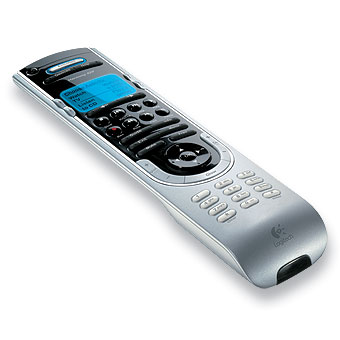
I’ve had my eye on the Logitech Harmony 520 for several months now. It’s a universal remote made by a company called “Harmony” that was bought a while back by Logitech. The idea is basically that universal remotes universally suck because they stick you in this paradigm of “press CD, now the remote controls the CD player, press TV, now it controls the TV,” so to watch TV you end up pressing TV, turning on the TV, then switching to your ReplayTV or whatever, turning it on, switching to receiver, etc. And then when you’re watching TV, you decide you want to change the channel, or the volume, and your remote has to be in different “modes” to do these two things. Utter stupidity. Also, to program your remote, you generally have to sift through long lists of manufacturer codes, and god help you if you have a somewhat modern entertainment center that has a game console or PVR in it, because you will not find codes for it. Sorry.
Enter Harmony. Instead of being device-centric, it’s activity centric. So, I tell it that when I watch TV, I turn on the TV, set it’s input to component, turn on the receiver, set it’s audio/video inputs correctly, and turn on the ReplayTV. I then hit one button on the Harmony, “watch TV,” and all of the above happen automatically. Also, it knows that I want to change channels and use the menus on the ReplayTV, but if I change the volume, I want to do it on the receiver. It knows these things.
And how do you program it? You plug it in to a USB port on your computer (it works on my Mac beautifully), go to a website, and tell it all about your entertainment center, what brands and models you own, and it sends everything down to the remote without a single incantation of flashing lights and button sequences. On the off chance that you have some piece of gear or remote that it doesn’t know about (it knew about my Outlaw 1050 receiver, way out of the mainstream), you can teach it any signal from any remote in a nice, intuitive way.
I’ve been using the remote for about a week now. I bought it last Saturday morning, planning to spend the day setting it up and tweaking it. I was shocked (almost disappointed) when it took a total of 10 minutes to get it just the way I wanted. Everything just worked. It’s nice and slim, well-balanced in the hand, with a mix of hard and soft buttons. I really prefer hard ones that “click” when you press them down, and luckily most of the buttons used for our PVR and TV, volume, are of this type. It’s got a nice blue back light, is only mildly ugly (much less so than the bigger, more expensive models), and has totally supplanted our previous four-remote setup.
A couple of small gripes: since when you start an activity (like “watch TV”), it has to get a lot of stuff turned on and set up, you have to sit there for a few seconds with it pointed at your stuff waiting for everything to get going. A couple of times Leslie and I made the mistake of pressing the button then turning away, and it only got halfway done setting things up. But, at the end, it asked on it’s little screen, “is everything working OK?” It was simple enough to tell it that the TV still needed to be turned on (albeit not as simple as just getting up and turning it on by hand). So they have what seems a reasonable solution to that problem. The other little issue is the responsiveness of the volume keys. It doesn’t start changing the volume until a fraction of a second after you start pressing on the button, and keeps changing a fraction of a second after you let off. This can be obnoxious when you just want to change the level a few clicks, which I’m used to doing one-by-one.
Anyway, I’m happy to have finally found something that can kill all my remotes and actually be straighforward enough so that Leslie doesn’t kill me.
Leslie and I recently got this new printer, which kicks ass in many ways, but my most favorite has got to be the ability to print directly on special CD/DVD-R discs. Also I have found a handy repository of every imaginable cover image from CDs and movies. So now my when I make totally legal backup copies of my DVDs, instead of being cheesy-looking blanks with sharpie labels now look more like this:
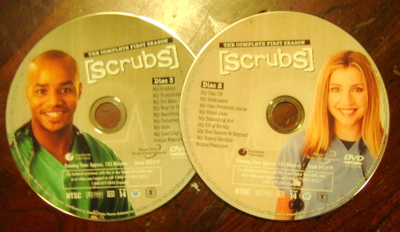
Home made! I love the age of cheap media production.
clare — 2005-10-22 10:43:02
That is so. incredibly. HOT.
So you have to buy special discs that are printable-onto? That diminishes its hotness only a bit.
bryan — 2005-10-23 14:31:37
yeah, you have to start with a white background if you want to get all the colors, so you have to buy special discs. But they don’t cost any more than the normal discs as far as I can tell. The biggest expense is probably the ink spent printing them.
I think I was sort of a half-student last year. I commuted several times a week, I got an advisor, I took some classes, but I wasn’t really going to Berkeley. Now I am here. I go to the office every day, I have these hard classes that I’m less afraid of because I can be around for studying. I feel transformed… not back into an undergrad, but at least back into a college student. Our apartment is a beautiful refuge, so much better than the dorm. Remember dorm food? Did that actually happen? Ick. T-minus two weeks to the prelim.